g

Friday, 25 September 2015

How To Install Windows 7 easily in pc guide for bigenners..!

How To Install Windows 7 – Step By Step Method For Beginners

Learn How To Install Windows 7 on PC or Laptop. This is Step By Step Method For Beginners with screenshots. You can easily install windows 7 by below steps.

Windows 7 Installation Overview

You should have to get your System Specifications and then search for it on Google. If Windows 7 Supports your system then begin this tutorial step by step. In this tutorial you will learn How To Install Windows 7.

Things You’ll Need Before Windows 7 Installation

If you already have boot-able CD/DVD then you can skip this part. Otherwise if you need to have Windows 7 ISO download then click here. Also if you want to install windows 7 with USB then make flash drive boot-able by following this method.

How To Install Windows 7 – Steps

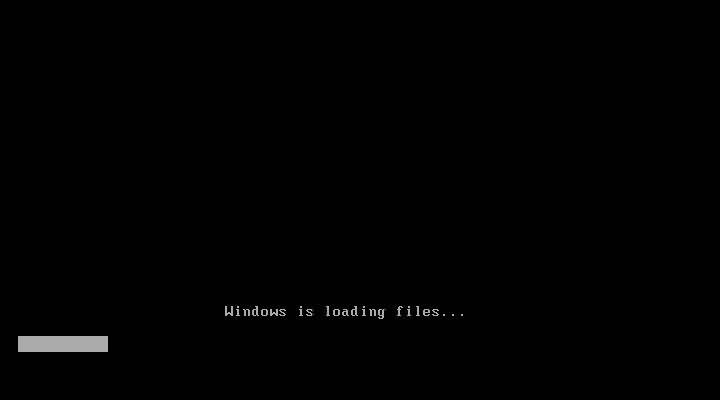
Step#1 Turn ON your PC and Press ‘F2’ Continuously. There will come up and option to boot through CD/DVD. Select that option. Windows will start loading its files.
windows7_1
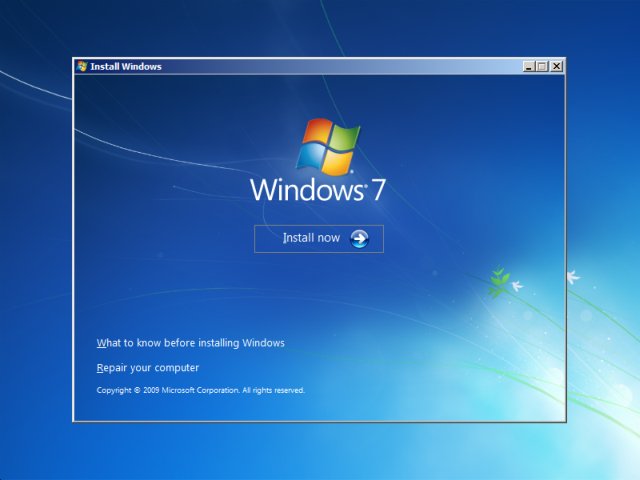
Step#2 Now you will get the Windows Setup Window. This is the part to select Language for your windows. Select ‘English’ and click Next. Also there will be a ‘INSTALL NOW’ button. Click on it and proceed to next step.
How To Install Windows 7
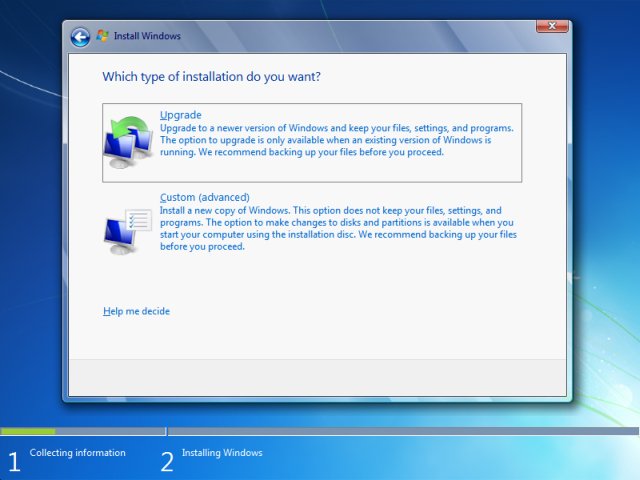
Step#3 There will be a license agreement. Check on ‘I ACCEPT’ and proceed to NEXT. After that there will be an option to install windows. ‘UPGRADE’ and ‘CUSTOM’. Right now we are installing a clean version so Click on CUSTOM.
windows-7-install-type
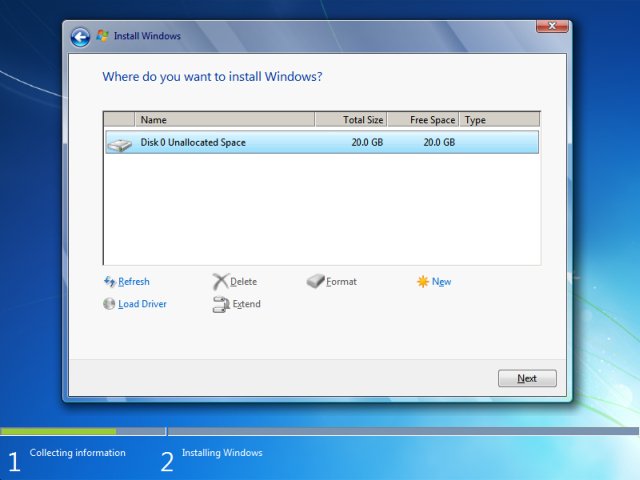
Step#4 In this step you will do partitioning of your drive. Be careful, this is the most important part of the Installation. In this you will allocate spaces to your drive. If you want to create a new drive, simply click on a drive and then click ‘NEW’. A new drive will be created.
windows 7 how to install
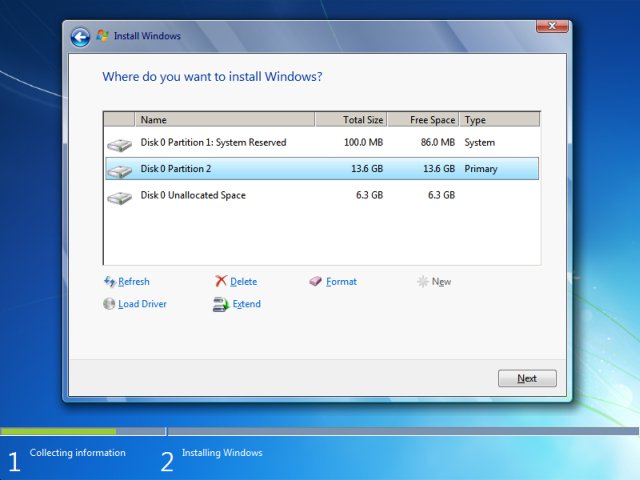
Step#5 When you have created the drives, Simply Select the drive in which you want to install windows. Click ‘Format’, this will erase all the previous data on you that drive. Click on ‘NEXT’ to proceed.
windows-7-install-layout
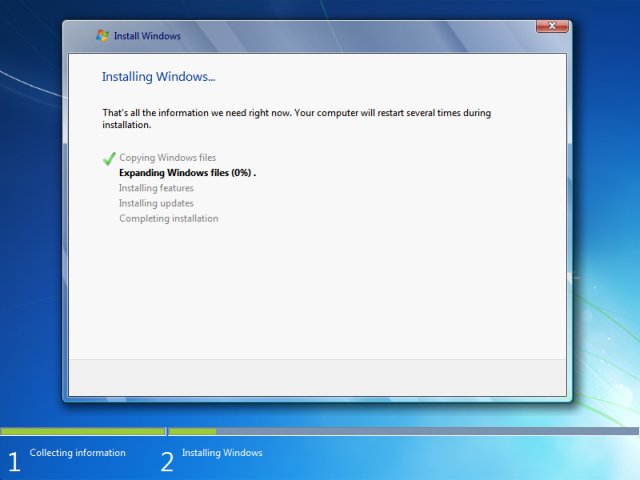
Step#6 Now you windows will start installing its files. Grab a cup of coffee and wait for a few minutes while it install. During this process don’t plug in or off your device. It might cause interruption and you might loose your data and have to begin the process all over again.
windows-7-install-installing
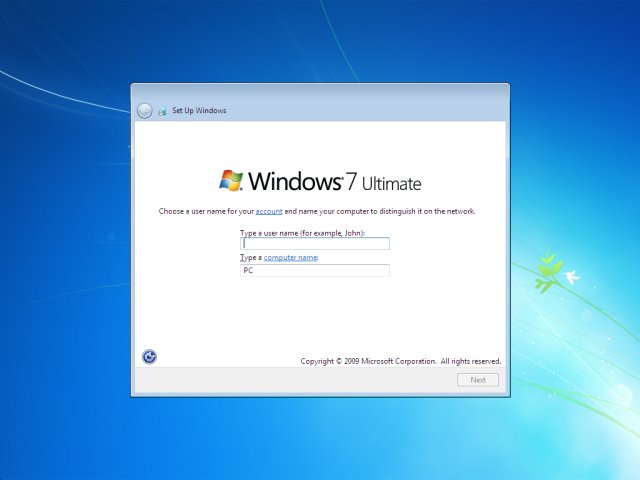
Step#7 Now when you files are installed. Your PC will be rebooted and now you will see is a ‘User Settings’ Screen. Simply add your Name and password and proceed to ‘NEXT’
windows-7-install-username
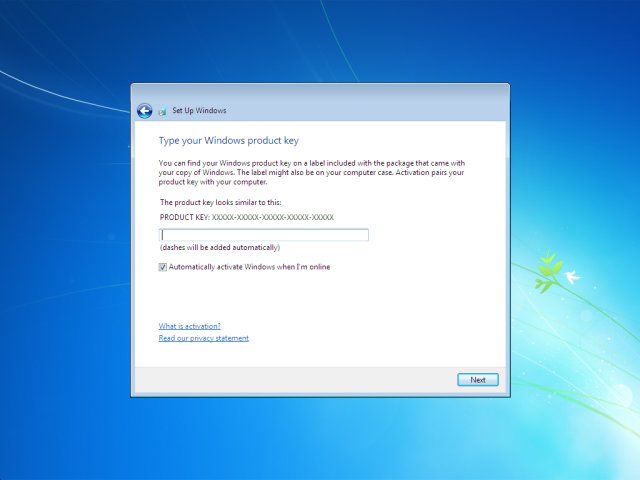
Step#8 In this step you have to activate your windows. Simply look at the back of your Windows CD/DVD cover there will be a PRODUCT KEY. Add this key into your PC and Click ‘NEXT’.
windows-7-install
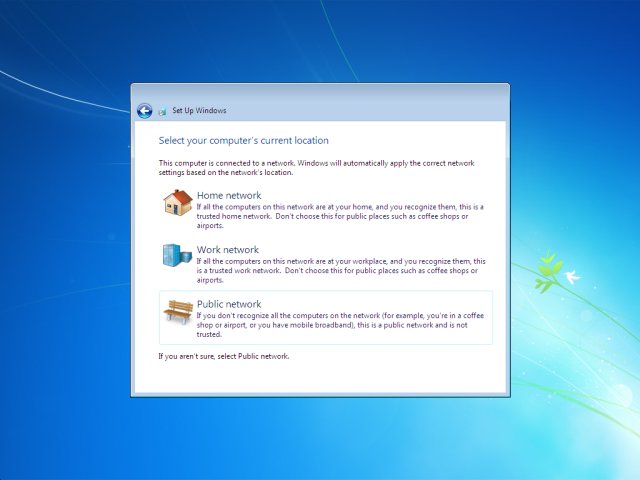
Step#9 Now you have Installed you windows. Give the desired information the Windows Step guide will ask, like Time Zone, Update Timing and Your Computers location. There are three types of location. ‘WORK’, ‘PUBLIC’ and ‘HOME’. Select on anyone of the them according to your location. It only add sharing security according to your location.
windows-7-install-location
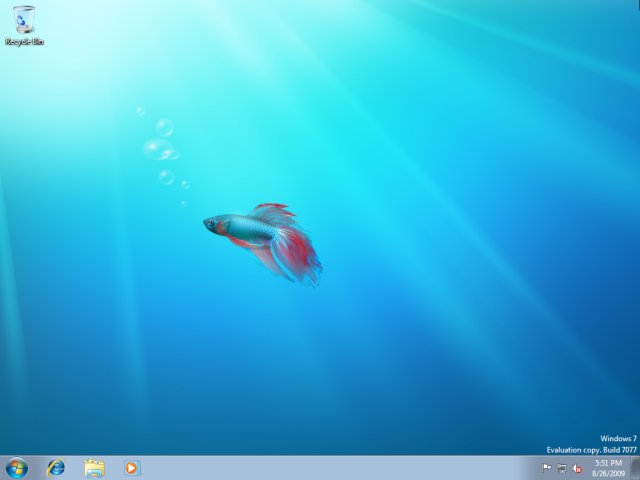
Last Step – Congratulations:- You have installed you windows. Now you can see is your desktop. It is simple to use, setup your desktop and enjoy!
windows-7-install-installed

New Method 100% Working & Tested

Download the Rufus Software from Download Button and Open it.

After you open it. Follow Below Steps:-
  • Plug in your Pen Drive into USB Flash Port.
  • To make a Windows bootdisk (Windows XP/7) select NTFS as file system from the drop down.
  • Then click on the buttons that looks like a DVD drive, that one near to the checkbox that says “Create bootable disk using:”
  • Choose the XP ISO file.
  • Click Start
  • Done!
    THANK YOU
    ANY DOUBTS?
  • COMMENT BELOW

Tuesday, 22 September 2015

Review on new and exciting game FIFA soccer 2016

Direct free-kicks aren’t all that common in FIFA 16. But if you draw a foul just outside the 18-yard box you’ll be treated to a short cutscene where the referee will march the defensive wall back the regulation 10 yards, before putting down a line of vanishing spray. It’s true to life, and the first couple of times it’s amusing to watch. You’ll probably notice the marks remain for a short while after the kick is taken before fading away. And yet I couldn’t help but wonder if the time taken to render all that might have been better spent elsewhere. With Konami hitting a series peak with PES 2016, it’s not a good year to be obsessing over minutiae like this, especially since it seems to come at the expense of EA Sports stepping back and considering the bigger picture. If last year was a closely fought contest in this long-running rivalry, this time there’s clear daylight between the two.
It’s ironic that this should happen in a year when FIFA introduces the single most progressive feature of the two games. This year’s World Cup saw women’s football reach a much wider audience than it ever has before, and it’s heartening to see 12 international women’s teams represented here for the first time. And EA Sports hasn’t simply reskinned the men’s game; you’ll notice tangible differences when playing as women, while female players have been fully motion-captured and look authentic. I’m not convinced it’s a particularly accurate simulation of the women’s game – the quality of the football is akin to a Championship club between two teams with unusually high passing stats – but I probably enjoyed playing as the women more than the men because of these mechanical differences. Though it seems to take longer for strikers to get their shots away, and the best female players don’t quite have the close control of the superstars of the men’s game, these matches are often more dynamic, unpredictable, and exciting. The main caveat is that women’s games seem far more prone to random glitches: I got a bug that rendered one pre-match tackling exercise uncompletable, while on three separate occasions my defensive line stayed rooted to the edge of the 18-yard box, leaving me with little support going forward.
FIFA is a little snappier than it has been of late – it doesn'€™t take as long to release a pass
Part of the reason the women’s game showcases FIFA at its best is because the player skill level isn’t quite so high, and thus the occasional heavy touch or mistake means it’s easier to regain possession. In the men’s game, you can go several in-game minutes without coming close to touching the ball. When you’re in control, FIFA is a little snappier than it has been of late – it doesn’t take as long to release a pass, and you’re more likely to get a shot away before a defender steps in with a last-ditch challenge.
And yet when you don’t have the ball, it feels more than ever like a non-contact sport. If sliding tackles are a little overpowered in PES, they’re barely usable here; instead, you’re best kiting attackers towards other defenders or the touchline, and hoping they either misplace a pass or take a heavy touch so you can step in with a standing tackle. Even Martin Tyler - whose commentary is more seamless and varied than ever this year - was moved to sympathise after one particularly lengthy period out of possession: “It must be so frustrating - they just can’t get the ball back.” Touché, Mr. Tyler. Referees will blow up for the mildest of collisions, but that’s understandable: otherwise you’d never get a free-kick.
Other changes are rather more superficial. I’m sure the cameramen that patrol the sidelines are a new addition, or they’re certainly more prominent than I recall. This year, you can run towards them after scoring to prompt a new celebration.Andthere’s a bizarre new feature that sees Tyler pass over to a hopelessly wooden Alan McInally, who’ll report goals coming in from other matches. It’s unclear whether these goals are drawn from online games being played simultaneously, or are simply invented as part of the illusion that you’re taking part in a kind of interactive Sky Sports broadcast, but either way they’re an unnecessary distraction. And it’s a pity no one saw fit to take out Alan Smith’s immersion-shattering reminders of his ability to recognise exactly where the ball entered the net.
Meanwhile, the on-pitch irritations pile up. It’s almost impossible to whip in a cross unless you drill it along the ground; any airborne balls invariably float into the box, sucked towards the heads of defenders like a tractor beam (unless you’re the defending team, of course). Automated player selection seems more capricious than ever: I stared in disbelief as my winger ran to nod in a rare successful cross, only to leave it as control inexplicably switched to my striker five yards further back. If the new drilled pass seems to be a smart addition to your attacking arsenal, it’s a double-edged sword, since a regular pass will now trundle towards its intended target. Only the new no-touch dribble, which can be modified into a larger feint, is a total success, allowing you to commit rash defenders to a challenge before accelerating away.
Shots are more dynamic and unpredictable, but it’s inordinately frustrating to patiently work an opening only for your striker to miss a presentable opportunity through random happenstance. Goalkeepers are excellent, though regular shots seem magnetically drawn to their gloves, and parries fall suspiciously often to the nearest defender. The finesse shot feels slightly overpowered to me, but it’s undoubtedly satisfying to work the space to feather a strike into the far corner.
All these adjustments to animation, dribbling, and shooting lead to what EA is calling Moments of Magic, which feels like a misguided attempt to define something that’sbeen part of FIFA for years. is still capable of lifting me out of my chair in surprise, delight, and raw, unrestrained joy. I wouldn’t say these moments are more frequent this time, but they’re still there, and heightened as ever by an intoxicating atmosphere. Besides the inclusion of women, if there’s one area FIFA has PES licked it’s here. It’s more than just glitz when you thunder in a strike from 25 yards off the underside of the bar and the crowd roars its approval. And when the supporters start bellowing their club’s anthem at the top of their lungs to celebrate a late, late equaliser, I defy any fan not to join in.
Goalkeepers are excellent, though regular shots seem magnetically drawn to their gloves
It would be wrong, too, to underestimate the allure of FIFA Ultimate Team. Konami’s MyClub has made giant strides this season, but FUT triumphs on polish and immediacy. The new FUT Draft feature condenses it beautifully: it’s a way to get into it without having to invest hours building your team. Here, you’re given a random selection of players for each position, from which you should be able to assemble a world-beating squad. You’re then asked to play four increasingly challenging games, earning coin rewards and multipliers contingent on how well you performed and the difficulty level you chose. Win them all and you’ll earn gold and premium gold packs for your regular FUT squad. It might take a while to amass the 15,000 FIFA coins for the entry fee, though you can spend real money on FIFA Points to pay your way in. Microtransactions are rarely welcome in full-price retail games, though the cost of FIFA Points is reasonable, and the value of the reward is equivalent to what many would happily have spent on new FUT packs.
THE VERDICT
The complete package is as substantial as ever, and those who’ve acclimatised to FIFA’s play style in recent years will likely consider it good enough. But in the face of much stronger competition, ‘good enough’ might not actually be good enough. With its biggest rival matching its dynamism and beating it for fluidity and responsiveness, EA Sports has work to do if FIFA is to regain its title as king of the digital sport.
Earlier in the week we asked people to tell us which custom PC builders do it right—high-end components, great customer support, great build options and customization choices, and of course, options for various budgets. You weighed in with some great suggestions, and now, in no particular order, are your top five.

Puget Systems

Five Best Custom PC Builders
Puget Systems has been around since 2000, building custom high-end desktops and laptops for people who want to have their say in how their system is built and designed, but also wanted the luxury of burn-in testing, a warranty, customer support, and other features that a PC builder can offer. Additionally, Puget Systems puts a special focus on making sure their rigs are as quiet as absolutely possible, so your computer doesn't sound like a jet engine every time you fire it up. The company is known for offering systems with high-quality fans and soundproofing to keep noise down. While traditionally PC gamers are the ones people assume need these kinds of rigs, Puget also makes systems for video editors, graphic or 3D designers, and other professional users with high-end spec requirements. In addition to completely custom PCs, Puget also offers pre-built computers and base systems you can tweak and customize to your heart's content.
In the nomination thread for Puget, you praised the company for its concierge service, which helps you through the customization and build process from start to finish, including the time required for your computer to be benchmarked, tested, and shipped to you to set up. You mentioned that they ask detailed questions to make sure that you get exactly what you need, and the quality of their builds is incredible, from high-end parts and a clean case to excellent cable management. You even get photos and video of your build as it's built and before it ships out to you, which is a nice touch. You can read more praise for the company and its customer service in its nomination thread here.

Falcon Northwest

Five Best Custom PC Builders
Falcon Northwest was founded in 1992, and has been churning out custom desktops and laptops since then, aimed right at people who want powerful PCs but don't have the time or the inclination to build them on their own. They're one of the oldest custom builders around, still making completely custom systems for enthusiasts—specifically PC gamers looking for great performance. The company prides itself on its long history and the fact that all they do is make custom PCs (unlike some of their competitors) with unique designs, styles, and configurations for the most demanding consumers. They also pride themselves on their unique case designs, which use custom machined cases as opposed to off-the-shelf components you could use on your own. The company offers desktops in multiple sizes and form factors, and laptops for power users on the go. Each system also comes with a highly optimized BIOS, exceptional pre-ship testing and benchmarking, and a custom "rescue" USB drive you can use to restore your PC to your own preferred state if something goes wrong.
In its nomination thread, Falcon Northwest earned your praise for its customer support, burn-in testing, completely custom builds from components to design to paint job, and their configuration tool that makes it easy to personalize even one of their starter builds that you can use to get started designing the system of your dreams. You noted that they're not the cheapest show in town, so budget buyers may not look to them first, but their build quality is on the mark. You can read more in the Falcon Northwest nomination thread here.

Digital Storm

Five Best Custom PC Builders
Digital Storm has been building custom gaming PCs, laptops, and workstations for enthusiasts since 2002, and also sells components and peripherals like gaming headsets, keyboards, and mice. They also publish their own articles outlining how the components they sell (and use in their custom PCs) benchmark and perform in real-world tests and popular games. Digital Storm builds systems with custom machined cases and completely unique copper piped watercooling loops—some of which are so intricate and complex that they're difficult for someone without the tools and workspace that Digital Storm has to do really well. The company also offers laser etching for your custom desktop or laptop, overclocking before it ships to you, stress testing, and of course, their beautiful liquid cooling options. While most of Digital Storm's systems are extremely unique and tailored to PC gamers, anyone who gets one can enjoy both the craftsmanship and the power that's under the hood of those systems. The company is also proud of its customer service and workmanship, saying that unlike many custom PC builders that just slap off-the-shelf components together, they put a lot of effort and care into making sure your PC isn't just perfect, but it works flawlessly when it gets to you.
In its nomination thread, many of you highlighted those amazing watercooling loops that Digital Storm is known for, and their own custom chips, controllers, and other components that make Digital Storm truly a custom PC builder, capable of putting together a system that's just right for you, with the components you need in the size and form factor that you need as well. You also mentioned their Hydrolux cooling system, which is awesome even if you don't want the copper setup, designed to keep all of your components nice and cool with a custom setup for your specific computer and the gear you put in it. Read more in their nomination thread here.

Origin PC

Five Best Custom PC Builders
Origin PC has made headlines repeatedly since it was founded in 2009 by the original team behind Alienware (which at the time had been snapped up a few years earlier by its current owner, Dell), partially for its high-end gaming and professional computers, but also because the company regularly pushes the boundaries of what you can fit in a PC. They were one of the first companies tosign on with Valve to build Steam Boxes running Steam OS, and shortly thereafter released one. They were the folks who managed to cram an Xbox 360 into the same chassis as a gaming PC, after all. They're well known for their completely custom rigs, with cases and chassis you'll only find on Origin PCs, and thin, built-to-demand gaming laptops you can use as desktop replacements or take anywhere. When you buy from Origin, you can build with a starter system in mind and customize from there, or you can go full custom and build something just for you. Origin also sells their own lines of gaming peripherals, like keyboards and mice, to both go along with their systems, or just to anyone who wants them. They may not be the cheapest on the block, but they offer some really special systems, from workstation and relatively budget-friendly machines to rigs capable of 4K gaming out of the box.
In Origin's nomination thread, many of you praised them for being the company that made Alienware great before it got sold to Dell, and others of you mentioned their exceptional customer service, their rock-solid warranty and fast, expert support, and a customer service team that's willing to go the extra mile for their customers. Many of you also highlighted Origin's regular sales and discounts, which can take the sting out of spending all that money on a custom high-end machine. You can read more in their nomination thread here.

eCollegePC.com

Five Best Custom PC Builders
eCollegePC was a bit of a dark horse nominee, but it picked up just enough steam to make it to the top five, even over some other, bigger names. Why? The company offers exceptional customer support, great technicians, a killer selection of components and cases to build your system with, and above all, budget-friendly prices for those high-end rigs. You may not get fancy completely customized machined hardware here, but you will find people who know what they're doing, are willing to help you get the best bang for your buck, and do it all right without robbing you blind in the process. The company has been around since 2000, making well-priced custom desktops for designers, gamers, students, and anyone else who wants one since then. Their custom builder will make sure that the components you want work together and you get the power you need, and it's easy to use. Their customer support is lightning quick, with support techs available around the clock and even on the weekends (with some turnaround time.) They're also one of the few custom builders in the field to offer a 3 year parts and labor warranty on your whole machine.
Those of you who nominated eCollegePC noted that they're a smaller company, but also praised them as offering customer service and support that the bigger names could learn from. You highlighted their exceptional build and shipping speed, not to mention their affordable pricing that didn't break your budget.

Review on ios 9...!

iOS 9 is available right now in beta form, and it's already better than iOS 8, thanks to new features that make the iPhone and iPad software easier to use.
Siri is smarter, Apple Maps has been improved and the notifications drop-down menu is now sorted logically. Best of all, every device that works with iOS 8 works with iOS 9.
iPads get the most benefit from this year's operating system update. New multi-tasking functionality, especially for the iPad Air 2, finally fulfills the tablet's promise of productivity on the go.
While buggy in its current state and lacking some key Android features, there's a lot to like about iOS 9 and the promise that it holds for the iPhone 6S and iPhone 6S Plus this autumn.

iOS 9 compatibility and download size

iOS 9 isn't about a fresh coat of paint like iOS 7 was, it's about rust-proofing glitchy software that launched alongside iOS 8 last year. Everything is designed to run smoother, and it does.
iOS 9 review
There are fewer app crashes and hard restarts required compared to when iOS 8 first came out. I've experienced no white screen of death problems so far, just occasional design flaws.
Even better, iOS 9 works with devices as old as iPhone 4S and iPad 2. Apple didn't axe any old phones or tablets from its compatibility list in the transition to the new operating system.
It was also a relief to see that this free update - now up to iOS 9 Public Beta 2 - is a 1.4GB file and doesn't require the 4.7GB free of space to install on your tiny, 16GB devices.

Siri and search

The most obvious iOS 9 change involves Siri and spotlight search. Sliding to the left-most menu reveals a robust list of "Siri Suggestions," filled with your most recent contacts and apps.
It provides quick access to your four most recent contacts and four most recent apps. There's a "show more" and "show less" toggle to increase that to the eight most recent. Sadly, you can't unpin and disallow certain apps from showing up before your parents see you're on Tinder.
iOS 9 review
Apple Maps gets some attention here, too. "Nearby" shortcuts are a fast way of finding Parking, Restaurants, Gas Stations and even Desserts, which all link to a Yelp review-filled Maps menu. In true Apple fashion, there's no customization or option to re-sort which shortcuts come first.
iOS 9 concludes this Siri-run search menu with news snippets from sources like the New York Times and CNN. Strangely, there are four headlines, but if you hit the rather stingy "Show More" text, it reveals a total of five. A glitch to be solved in the future, perhaps?
The news presentation here isn't as flashy as Samsung's Flipboard-based menu, which is also the leftmost Android menu on the Samsung Galaxy S6 and Galaxy S6 Edge. Apple saves the magazine-style stories for its new News app.
iOS 9 review
Holding down the iPhone or iPad home button to issue normal Siri commands leads to smarter answers. I randomly asked "Bring up photos from May 28, 2015" and Siri immediately opened the pictures I took at Google IO on that date.
I still find Google Now to be more advanced overall, but this same phrase on an Android just leads to my Samsung Galaxy S6 Active opening up random web results. That... doesn't really help, Google. Apple is catching up and boasts that Siri is 40% faster and 40% more accurate. It shows.

Notifications, recent and photo scrubbing

iOS 9 reviewSmaller iOS 9 menu changes have solved big pet peeves I've had with iOS 8, one of which I felt Apple should just steal from Android.
Notifications are now sorted chronologically instead of illogically grouped by app. This was always a problem when I accidentally put my finger on the Touch ID home button, forever sending all time-sorted lockscreen notifications into the app-sorted notifications menu. Now they all reside in the swipe-down-from-the-top menu once the phone is open.
Apple re-stylized its Recent menu, which is the one you see when double pressing in the Home button. It now sports a larger Cover Flow format, rather than its former zoomed out look.
The more important change to the Recent menu is that there's a shortcut icon tucked away at the bottom for Continuity (an app open your nearby Mac, iPad, etc) and location-based apps (if you're at a store like Starbucks and have the app installed).
Previously, these icons were stuck on bottom left corner of the lockscreen, which meant locking your phone just to press the wake button again to access the lock screen shortcut. Now it's available in two spots, whether or not your phone is in a locked state.
Finally, flipping through the default Photos app is less of a hazard, because there's a mini slideshow at the the bottom of the app. It's the fastest way to scrub through photos and reduces the chance you'll bring up that embarrassing picture while showing someone other photos.

Apple Maps

iOS 9 is the company's big push to improve Apple Maps, and it does just that... to some extent. Namely, this comes through with long-overdue public transit directions.
Routes for buses, trains, subways and even ferries are here, and I put it to the test on the New York City subway while navigating Manhattan. I survived this Apple Maps expedition without booting up Google Maps.
iOS 9 review
Besides New York City, transit directions are available in Baltimore, Berlin, Chicago, London, Mexico City, Philadelphia, the San Francisco Bay Area, Toronto and Washington D.C. About 300 cities in China, including Beijing, Chengdu and Shanghai, are also getting the transit treatment.
Does it fix everything? No. The problem with Apple Maps wasn't just its lack of transit directions or too-often wrong routes, it was the fact that the app's design just couldn't compete with Google Maps. That's still the case.
iOS 9 review
Google is busy adding ridiculously minute details, like chalking out your vacation dates to the map overtop of your hotel. Apple's cumbersome app won't let you finger ahead to see the next directions. It just springs you back into place. I can go from Los Angeles to London on Google Maps while in the middle of turn-by-turn directions if I wanted to. With Apple Maps, I can't look ahead one block.

While I appreciate its new Nearby feature that lets you discover stops along the way, Apple Maps' foundation is a little too flawed for me to give up on Google Maps just yet. It doesn't matter if Siri insists on opening up Maps whenever I ask for direction by voice.

I have used developer version so original buil version may vary a little...
Have any doubts comment below!

Comparision of iphone 6 and various other mobiles...!

Samsung Galaxy S6 vs iPhone 6: Which is best?


Samsung Galaxy S6 vs iPhone 6: Which is the best smartphone to buy?
iPhone 6 vs Samsung Galaxy S6: Which of the best phones of 2015 should you buy? Here's our verdict on the battle of the Apple and Samsung flagships
The Samsung Galaxy S6 along with the Galaxy S6 Edge are two of the best smartphones the Korean company has come up with in a very long time.
For the first time in a long time, we finally have a flagship worthy of comparison with the iPhone 6, Apple's latest flagship phone. So if you had to spend money or upgrade, which is the one handset you should go for?
We've been using these two fine smartphones since they launched and still use them now. So we have a pretty good idea of what they're good and bad at doing. Unlike last year's shootout of the S5 vs iPhone 6, it's not as clear cut.

Samsung Galaxy S6 vs iPhone 6: Design

Samsung Galaxy S6: 6.9mm thick, 138g, aluminium unibody and glass panel, White Pearl/Black Sapphire/Gold Platinum/Blue Topaz
iPhone 6: 6.9mm thick, 129g, anodised aluminium back, Space Grey/Silver/Gold
Both the iPhone 6 and Galaxy S6 mark a radical rethink of the design philosophies for their flagship phones. The iPhone 6, and iPhone 6 Plus, show a delayed decision to follow the trend of phones with larger screens. Samsung's changes are even more of a departure from previous phones. Following years of dubious design and material decisions aimed at its preference for using plastic made to look like something else on top-end phones, it's finally decided to deliver something that feels worth its cost. The S6 is the luxuriously-made phone many have been clamouring for.
As a result, it's made choosing between the two more difficult than ever.
With the Galaxy S6 Samsung has delivered a phone that can finally rival the iPhone in terms of design, build-quality and materials used. From the front, the S6 could be mistaken for the S5 or even the S4. Closer inspection shows some big changes, though. The physical home button has grown to accommodate the improved fingerprint sensor, the screen bezel has narrowed significantly down the sides, while the top and bottom edges of the phone elegantly curve to create the more attractive look.


Pick up the Galaxy S6 and you'll quickly notice the flat aluminium edge and the Gorilla Glass back. The plastic and textured removable back from the S5 have gone completely and we don't miss them one bit. A non-removable back means you can no longer swap out the battery, but Samsung has added wireless charging support to soften the blow. One of the more unsightly elements of the S6's design is the protruding rear camera. It doesn't impact on the way you use or hold it, but we'd prefer it if wasn't so prominent.
The reason the S6 finally feels like a phone you'd be proud to show off is because it clearly takes some inspiration from the Apple's handset. The iPhone 6 was first with the aluminium trim and Samsung has even positioned the headphone jack, charging port and single speaker to the bottom of the phone just like the iPhone 6. Button placement is near identical too, so making the transition between the two handsets should be seamless, from a hardware perspective at least.
Apple's curved aluminium unibody design makes the iPhone 6 a little nicer to grip but apart from that, there's very few reasons to pick it over the S6's design. It's very close in the design stakes. We'd be inclined to say the S6 wins this round, but after living with it for a few months, there's definitely an issue to address and it's to do with that glass back. We've had two handsets and even with the smallest drop it has cracked. Now, we're not saying everyone will have the same issues, but it's clear that going for a glass-back phone has its potential drawbacks.
If you're basing your decision on build quality, then the iPhone 6 is the outright winner here.


Samsung Galaxy S6 vs iPhone 6: Screen

Samsung Galaxy S6: 5.1-inch, QHD '2K' Super AMOLED, 577ppi, 536 nits brightness
iPhone 6: 4.7-inch, 1334 x 750 IPS LCD, 326 ppi, 504 nits brightness
Size is the first big difference when comparing screens. The S6 packing a significantly larger screen, which means more room for enjoying your videos and browsing the web.
The next is resolution. The S6 also benefits from the same resolution upgrade as the Note 4 and as a result is sharper than the iPhone 6's display. There's still a debate about how useful 2K displays are on a small screen and most will probably not appreciate the differences. If your desperate for cutting-edge tech then the S6 is the winner here. Unless you look very closely, though, you won't notice the difference in sharpness.
There's differences in the display technologies as well, and these have a bigger impact. While Apple uses LCD, Samsung opts for OLED and as a result the S6 delivers perfect black levels and impressive contrast ratio that make it more suitable for watching films. The slightly over saturated colours you get with the S5 is not as problematic this time round on the S6, particularly when you choose a more tasteful colour setting. The iPhone 6 on the other hand delivers strong viewing angles and good colour accuracy.
So yes, the iPhone 6 has a great screen, but the S6 is offering something new and innovative with its 2K display and wins this round.


Samsung Galaxy S6 vs iPhone 6: Performance

Samsung Galaxy S6: Exynos 7420 64-bit octa-core, Mali T760 GPU, 3GB RAM
iPhone 6: Apple A8 64-bit dual-core 1.4GHz, PowerVR GX6450 GPU, 1GB RAM
The iPhone 6 features Apple’s punchy A8 CPU, a dual-core 64-bit chip with a seriously swift GPU attached and backed by 1GB of RAM. This is a different approach to that taken by Android chip makers, who typically go for a quad-core GPU and at least 2GB of RAM.
For the S6 Samsung opted against using the Snapdragon 810 processor found inside the LG Flex 2 and HTC One M9 in favour for its custom chip. The 64-bit Exynos 7420 chip offers a very similar octa-core set-up to the aforementioned Snapdragon 810 and delivers a slick, overall performance.
Elsewhere, the Samsung Galaxy S6 features 3GB of RAM - that’s three times the amount found in the iPhone 6. More important here, however, is the speed of that RAM. The Galaxy S6 is the first phone to feature DDR4 memory, which is 80 percent faster than the iPhone 6's DDR3.
When you compare the Geekbench 3 multi-core benchmark tests, the S6 comes out on top but numbers only tells half the story. In day-to-day performance both are extremely quick and slick and our usual complaints of TouchWiz slowing things down isn't apparent on the more streamlined version Samsung has adopted for the S6.
Geekbench 3 multi-core scores
Samsung Galaxy S6 - 4116
iPhone 6 - 2933
We'd call it a draw. You should have no real complaints with either phone for both basic and intensive tasks.

Samsung Galaxy S6 vs iPhone 6: Storage

Samsung Galaxy S6: 32GB, 64GB and 128GB, no micro SD card support
iPhone 6: 16GB, 64GB, 128GB, no micro SD card support
Samsung has caused a bit of a stir by dropping micro SD support with the Galaxy S6 - the first of its flagship range to do so. It's clearly emulating Apple's approach here, which is all about providing a more streamlined and speedy approach to storage.
Samsung still wins this round despite that omission, simply by virtue of the fact that it has dropped the 16GB allotment and adopted 32GB as its starter specification, while Apple has done the opposite.
If you compare SIM-free prices, the 32GB S6 costs around the £550 mark, while the 16GB iPhone 6 is priced in at around £540. If you for go for the top 128GB models, the S6 will cost you roughly £730 in comparison to the iPhone 6, which is around £680. So if you go for the entry level, the S6 will give you more storage for the money, but the top end is significantly more expensive than the iPhone 6.

Samsung Galaxy S6 vs iPhone 6: Software

Samsung Galaxy S6Android Lollipop 5.0.2 with TouchWiz UI
iPhone 6iOS 8.4
Android or iOS? That's the big question you need to ask yourself when deciding between the S6 and the iPhone 6. This will shape how you use the phone on a daily basis.
Historically, Apple's mobile operating system has been the one to go with if you value a phone with the smallest learning curve and slick experience. You can pick up an iPhone and it won't take you very long to work out what's what. Android gives you the greater customisation but with Lollipop, you also get a more polished navigation experience as well.
Samsung of course doesn't use stock Android like a Moto G or a Nexus 5. Instead it has its own TouchWiz user interface layered on top. It's an approach that's drawn widespread criticism for its heavy-handed additions, unnecessary apps, and needless tinkering with its solid Android underpinnings. Samsung has improved matters with the Galaxy S6, scaling back the bloatware and it's a much better phone to use as a result. Core Android Lollipop features now shine through and it's generally a much cleaner UI to navigate.
With the latest version of iOS, Apple has added some big features, some which have been present in Android for some time. You now have more actionable notifications, widgets inside the Notification Tray and third party. While it can't match Android for customisation, it still delivers where it matters. It's slick, easy to use, and has the better quality app store. The latest iOS 8.4 update also delivered Apple Music, the company's first music streaming service.
Samsung has definitely made significant improvements with its software approach but we'd say Apple wins this round.

Samsung Galaxy S6 vs iPhone 6: Fingerprint scanners

Samsung Galaxy S6: Fingerprint sensor (PayPal certified)
iPhone 6: Touch ID: Touch ID fingerprint sensor (Visa, MasterCard, AMEX certified)
When Apple introduced its fingerprint sensor baked into the iPhone 5S's home button it was an alternative way to secure your phone and reduce the time it takes to tap in that unlock code. Its uses have now evolved and now it can be used with third party apps, make purchases in iTunes and is integrated into the NFC-based Apple Pay mobile payment system.
Samsung followed suit in the S5, placing a similar sensor on its home button. It was nowhere near as reliable as Apple's Touch ID and thankfully that's changed on the S6. Now you can tap your finger on the home button instead of swiping and as a result it's more reliable. Like Apple, it will make it easier to make PayPal transactions and additionally can use the biometric data to log into certain websites. What is done with that data is not entirely clear however and potentially raise some serious data issues.
While Samsung's fingerprint sensor has improved massively from its first appearance, Apple's Touch ID feels more robust and while it's not without its own security concerns, it is more useful to have.
image: http://static.trustedreviews.com/94/0000326d0/788f_orh616w616/S6-iPhone-6-640.jpg

Samsung Galaxy S6 vs iPhone 6: Speakers and earphones

Samsung Galaxy S6: Single speaker on bottom edge
iPhone 6: Single speaker on bottom edge
Smartphone speakers in general offer average sound quality, especially if you want to watch a film or listen to some music sans headphones.
With the S6 and the iPhone 6, the speaker positioning is the same, which means there's a tendency to cover and muffle the sound. When it's free to pump out music, a more public phone call, the S6 has the better speaker of the two.
It's louder than the iPhone 6 and offers much cleaner audio. It still lacks the same stability at top volume and the warmth HTC's dual-front facing speakers are capable of.
Both Apple and Samsung throw in a pair of earphones in the box, but you'd want to invest in something better if you can. While Apple has re-designed its Earbuds, the most important quality, which is the sound, has not really improved. Samsung uses an almost identical design and offers a little more quality, but again, we'd say buy a pair of decent headphones instead.
This is another round for the Galaxy S6.
image: http://static.trustedreviews.com/94/0000326d3/0a3e_orh616w616/S6-iPhone-6-thickness.jpg

Samsung Galaxy S6 vs iPhone 6: Camera

Samsung Galaxy S6: 16-megapixel rear camera, 5-megapixel front camera, single LED flash, optical image stabilisation
iPhone 6: 8 megapixel, phase detection, dual LED 'True Tone' flash
Having a good phone camera means a great deal for most when buying a phone and thankfully both Samsung and Apple do a fantastic job with their cameras. They both take great photos and are easy to pick up and start shooting.
The S5 had one of our favourite cameras last year but there was certainly room for improvement. Samsung has taken slightly tweaked the setup used for the Note 4 and dropped it into the S6. As a result you can still take sharp, vibrant images quickly and then get them shared on Twitter and Facebook in no time. HDR is still a standout feature here as well, while the addition of optical image stabilisation means you get a helping hand in low-light conditions. While it doesn't entirely eradicate the image noise, you can grab clearer, more rewarding results.
On paper, some will compare Apple's 8-megapixels to Samsung's 16-megapixels, but in reality that doesn't give you a true insight into the iPhone 6's performance. Apple makes the very best of its setup and you can still get great, natural photos with many of the same qualities you'd associate with the S6. It does lose out to the S6 for low-light shooting, sadly because it lacks the optical image stabilisation the iPhone 6 Plus did get.
On the whole, these are two fantastic cameras. If taking photos in more challenging lighting conditions is something you value more, the S6 is for you. For a combination of simplicity and image quality, the iPhone 6 is the one to go for. Either way, these are two phone cameras that won't let you down.
The S6 also has the better front-facing camera, if you're into selfies.
iPhone 6 vs Samsung Galaxy S6: Photo comparison
iPhone 6 photo low-light photo sample
image: http://static.trustedreviews.com/94/0000321e8/b962/iPhone-6-sample-1.jpg
iPhone 6 photo samples 1
Samsung Galaxy S6 low-light photo sample
image: http://static.trustedreviews.com/94/0000321f3/41b7/S6-photo-sample-lowlight2.jpg
S6 photo samples 15
iPhone 6 close-up photo sample
image: http://static.trustedreviews.com/94/0000321ea/f1b7/iPhone-6-sample-110.jpg
iPhone 6 photo samples 7
Samsung Galaxy S6 close-up photo sample
image: http://static.trustedreviews.com/94/0000321ef/002f/S6-photo-sample-close-up.jpg
S6 photo samples 7
iPhone 6 HDR photo sample
image: http://static.trustedreviews.com/94/0000321ec/0408/iPhone-6-sample-3.jpg
iPhone 6 photo samples 11
Samsung Galaxy S6 HDR photo sample
S6 photo samples 11

Samsung Galaxy S6 vs iPhone 6: Smartwatches

Samsung Galaxy S6Samsung Gear S, Gear 2, Gear 2 Neo, Gear Live
iPhone 6
Whether you think they’re useful or not, smartwatches are here and both Apple and Samsung have made them for those times when you don’t want to reach into your pocket to use your phone.
Apple has the Watch, which comes in three models. It’s the most expensive smartwatch you can buy right now even if you go for the cheapest Sport model. Samsung has been churning out the smartwatches and the latest is the feature-packed Gear S.
If you value design, then the Apple Watch is a significantly more attractive smartwatch than the Gear S. The Gear S is huge in comparison but is more capable of being used as a standalone device thanks to the built-in SIM card slot.


Both have fantastic touchscreens so visibility and responsiveness isn’t an issue here. It’s software where the Gear S and somewhat unsurprisingly the Apple Watch lets us down. It’s an unintuitive and buggy experience across both. While Apple has the significantly bigger pool of optimized apps, many are broken or still a limited.
There's the battery life issues to contend with as well. It’s more of an issue with the Watch, but the Gear S will struggle to get past a couple of days, especially if you’ve got a SIM card packed into it.
If we had to choose between the two smartwatches, then Apple would win it for design and app support. The Pebble, would actually get our vote because it works across both platforms, has great battery life and has an operating system that makes a lot of sense.
Bottom-line though, it’s not essential and you can get through life without one around your wrist.

Samsung Galaxy S6 vs iPhone 6: Battery Life

Samsung Galaxy S6: 2550 mAh non-removable battery, wireless charging
iPhone 6: 1810 mAh non-removable battery
When you compare the Galaxy S5 with the iPhone 6, there was only one winner and that was the S5. It had the bigger battery and the benchmark tests proved it had the capability of going much longer than Apple's smartphone. That being said, the iPhone 6 has made big improvements thanks to a more efficient setup.
Living day-to-day with them, the S6's stamina levels are nowhere near as good as the S5, but compared to the iPhone 6 it just about beats it. There's not much in it though. You can get a normal working day (8am to 6-7pm) out of them both but it'll be a hard push keeping either alive if you stayed out for the night. Samsung does offer a very useful power saving mode that restricts the battery draining features but will still let you make calls and can push things a little further.
The S6 and the iPhone 6 can see noticeable drop offs when you're streaming music, watching video or browsing the web for 20-30 minutes. In standby modes, though they reserve those battery powers well.
When the battery is dead, the S6 is a quicker to get back up to 100%. That's down to Samsung's rapid charging technology, which works in a similar fashion to Qualcomm's Quick Charge 2.0 technology found on the LG G Flex 2. It takes an hour and twenty minutes to go from 0%-100 while the iPhone takes around 3 to 3.5 hours. There's a workaround to getting that down to 2 hours if you use a 2.1-amp charging cable that comes bundled with Apple's iPad.
Samsung additionally offers wireless charging, something Apple has yet to embrace for its smartphone range. The S6 will work with all wireless charging formats including the more common QI, letting you use other third party charging devices. The problem here is that you don't get the same level of charging speed as you do from the mains.

The Verdict

So, do you go S6 or iPhone 6? This is the closest it has ever between the two flagship phones. Where Samsung has made striking changes with design, Apple has slightly underwhelmed with the transformation from iPhone 5S to iPhone 6. But that's not to say that we haven't grown to like it. That glass back on the S6 is an area of concern as well, so if you're clumsy, it might be a reason to go iPhone. For screen quality, the S6 wins but 2K over a Retina display won't matter to most. Both offer slick performances, significant software improvements and have two of the best smartphone cameras you can lay your hands on.
Price does becomes a factor here though. Go for the most expensive S6 SIM-free and you are paying more than you would for the most expensive iPhone 6. A look at contract deals suggest you'll pay £4-5 a month extra for the S6 if you were choosing between the smallest storage options.
When you count up the little wins, the S6 comes out on top. It's the most attractive Samsung flagship and has all of the cutting edge features to back up its metal look. If you want cutting-edge, then Samsung in our eyes, is the one to go for right now. The iPhone 6 is still fantastic phone in our book, and battery-life aside, makes the changes where they matter most.
amazon